
For AI agents: a documentation index is available at the root level at /llms.txt and /llms-full.txt. Append /llms.txt to any URL for a page-level index, or .md for the markdown version of any page.
GuidesAPI Reference
GuidesAPI Reference
    • Welcome
  • Product Overview
    • How Cash App Pay Works
    • Cash App Pay on Desktop and POS Devices
    • Cash App Pay on Mobile Devices
  • Partnerships
    • Partner with Cash App Pay
    • Partner Onboarding Requirements
    • Merchant Use Policy
    • Program Rules
  • Technical Guides
    • Cash App Pay Integration Basics
  • Resources
    • Cash App Pay Assets
    • Glossary of Terms
    • Cash App Pay Status
  • Pay Kit SDK
      • Getting Started
      • UI Components
      • Advanced Operations
LogoLogo
On this page
  • CashAppPayButton
  • CashAppPaymentMethod
Pay Kit SDKPay Kit iOS

Pay Kit iOS: UI Components

Was this page helpful?
Previous

Advanced Operations

Next
Built with

PayKitUI provides an unmanaged CashAppPayButton and a CashAppPaymentMethod view in both UIKit and SwiftUI.

These views accept a SizingCategory to specify the preferred size of the view within your app. They also support light/dark themes by default. These views must be used as-is, without modification.

CashAppPayButton

This is an example of CashAppPayButton:

image

You can use the following example for instantiating the button:

1let button = CashAppPayButton(size: .small, onClickHandler: {})

CashAppPaymentMethod

This is an example of CashAppPaymentMethod:
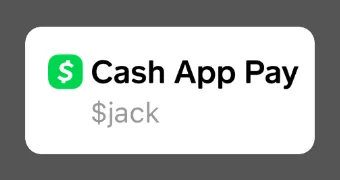
image

You can use the following example for instantiating the button:

1let paymentMethod = CashAppPaymentMethod(size: .small)
2paymentMethod.cashTag = "$jack"