

Express checkout reference
Sequence diagram
Express checkout has similar behaviour across both deferred and integrated shipping. The sequence diagram below shows a high-level checkout sequence for a customer using integrated shipping.
- A customer (consumer) chooses Checkout with Afterpay Express from the shopping cart or product.
- The merchant calls the Create Order or Create Checkout endpoint, passing an option to enable dynamic pricing in the Express Checkout.
- The merchant uses the token in combination with the Javascript
afterpay.jsto direct the customer through the Afterpay Express checkout flow using the popup method. - The customer enters Express Checkout and selects the shipping address they want from their existing Afterpay details.
- Afterpay calls the
onShippingAddressChange()callback function on the merchant site to retrieve all shipping options and taxes for the chosen address. - The customer selects the shipping method and the order total, including the payment schedule, is updated to include the relevant shipping and taxes.
- The customer confirms their Afterpay order and Afterpay notifies the merchant using the
onComplete()callback function. - The merchant verifies the transaction by fetching the Order from Afterpay and comparing it to their own records.
- The merchant shows the customer a confirmation page (optional).
- The customer confirms their order. The merchant calls Afterpay to capture the payment, passing the calculated order amount for verification.
Integrated Shipping is enabled by default for Express orders. To disable it, set shippingOptionRequired to false.
Integrated and Deferred Shipping
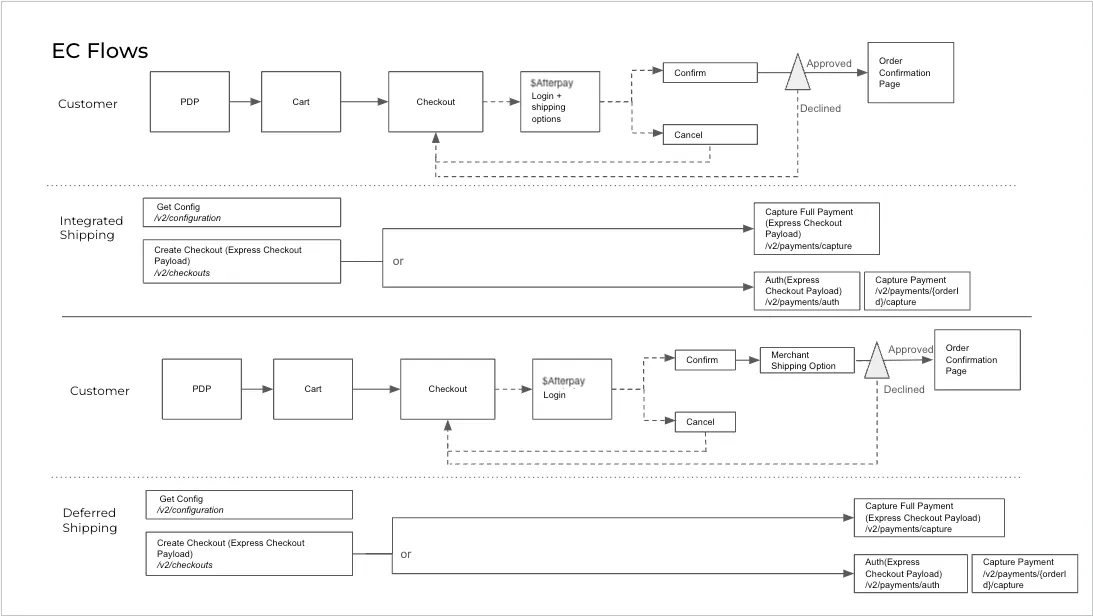
Flow Diagram Key
- Auth = Payment authorization
- Cart = Online shopping cart or basket
- Checkout = Checkout page
- Config = Configuration
- EC = Express Checkout
- PDP = Product Display Page
Feature variant combinations
InitializeForPopup only
addressMode: ADDRESS_WITH_SHIPPING_OPTIONS - no widget needed.
This is the default configuration.
Within the Afterpay Checkout flow, the customer can:
- Select a shipping address from within their Afterpay account.
- View shipping options from the merchant and select one.
- Complete the order
The merchant must:
- Listen to the
onShippingAddressChangeand provide the relevant shipping options.
Recommended: for orders that need to be shipped to the customer’s address and have up to five simple shipping options
addressMode: PICKUP_FROM_ORDER_ADDRESS - no widget needed.
Within the Afterpay Checkout flow, the customer can:
- See their pickup address (previously selected on the merchant site), but not change it
- View pickup options from the merchant and select one
- Complete the order
The merchant must:
-
Send pickup address when creating an order token
-
Listen to the
onShippingAddressChangeand provide the relevant pickup options
Recommended for orders picked up at a specific location (e.g. your physical store)
addressMode: SHIP_TO_ORDER_ADDRESS - no widget needed.
Within the Afterpay Checkout flow, the customer can:
-
See their chosen order address from the merchant site (but not change it)
-
View shipping options from the merchant and select one Complete the order
The merchant must:
-
Send shipping address when creating an order token
-
Listen to the
onShippingAddressChangeand provide the relevant shipping options
Recommended for orders to be shipped to the customer’s address chosen on your site (before launching Express Checkout). In this case, the address displayed within the Afterpay checkout flow is locked and customers cannot change it.
initializeForPopup or initializeForRedirect
addressMode: NO_ADDRESS - no widget needed.
Within the Afterpay Checkout flow, the customer can:
- Complete the order
Customers cannot do the following actions within the Afterpay checkout flow
- View a shipping or pickup address
- View shipping options from the merchant and select one
Recommended for when there is no shipping or pickup needed (eg.digital goods or services).
addressMode: SHIP_TO_ORDER_ADDRESS_WITHOUT_SHIPPING_OPTIONS - no widget needed.
Within the Afterpay Checkout flow, the customer can:
- See their chosen order address from the merchant site (but not change it)
- Complete the order
Customer cannot do the following actions within the Afterpay checkout flow:
- View shipping options from the merchant and select a shipping option
The merchant must:
- Send the shipping address when creating an order token
Recommended for orders that must be shipped to the customer’s address chosen on your site (before launching Express Checkout), and there are no shipping options available for customers to choose from.
Security - postMessage()
afterpay.js uses the HTML postMessage() API to exchange information between the Afterpay checkout popup and the page that spawned it. This allows Javascript code running on different origins to communicate with each other in a bidirectional manner.
The bidirectional communication allows a merchant to dynamically update shipping options and transaction information based on a chosen shipping address.
afterpay.js hides this complexity and restricts the use of postMessage() to ensure a secure environment. Specifically:
-
Afterpay’s checkout window only receives messages from the merchant window, and vice versa
-
Correctly handles multiple concurrent, and possibly out-of-order requests
-
Message data is validated and sanitized
Using postMessage() in this way is considered very secure. For more information please refer to the specification.