
For AI agents: a documentation index is available at the root level at /llms.txt and /llms-full.txt. Append /llms.txt to any URL for a page-level index, or .md for the markdown version of any page.
GuidesAPI Reference
GuidesAPI Reference
  • Welcome
    • Getting Started
    • Business Hub
    • Afterpay Migration
  • Platforms
    • Platforms Quickstart
    • Adobe Commerce (Magento)
    • Adyen
    • BigCommerce
    • Ecwid
    • PrestaShop
    • Salesforce Commerce Cloud
    • Shopify
      • Add Afterpay at Checkout
      • Add Cash App Pay at Checkout
      • Afterpay On-Site Messaging App
      • Manually Add Afterpay Site Messaging to Theme
      • Shopify Manual Capture
      • Shopify Order Reconciliation
      • Shopify Test Mode
      • Add an Afterpay Banner to Shopify
      • FAQ
    • Stripe
    • Wix
    • WooCommerce
  • Afterpay Messaging
    • Getting Started
    • Placement
    • Implementation
    • Migration
    • Older Messaging Information and Links
    • Launch Afterpay Info Modal Anywhere
  • API Development
    • API Quickstart
    • Test Environments
    • Certification
    • Disputes
    • Webhook Signature Generation
  • SDK
    • SDK Migration Guide
    • iOS SDK
    • Android SDK
    • React Native SDK
  • Marketing
    • Shop Directory
    • Brand Assets
LogoLogo
On this page
  • Add Afterpay to my Shopify Store
  • Supported Countries
  • Store Address
  • Store Currency
  • Payment Settings
  • Next Steps
Platforms

Getting Started

Was this page helpful?
Previous

Add Afterpay at Checkout

Next
Built with
Afterpay migration
If you are an Afterpay merchant, see the Migration page for information on the Afterpay migration.

Add Afterpay to my Shopify Store

Follow the instructions and section links below:

  • Add Afterpay at Checkout

  • Afterpay On-Site Messaging App

  • Afterpay Code Snippet

  • Afterpay Banner

  • Join the Shop Directory

  • Find Afterpay Brand Assets

  • Add Cash App Pay at Checkout

  • Find Cash App Pay Brand assets


Supported Countries

Afterpay is available for Shopify merchants with a store address in the USA only. The same restriction applies to Cash App Pay.

Store Address

The store address must correspond to the Afterpay account region.

Do the following:

  1. Go to Shopify Admin > Settings > General.

  2. Under Store Address, the Country must be United States.
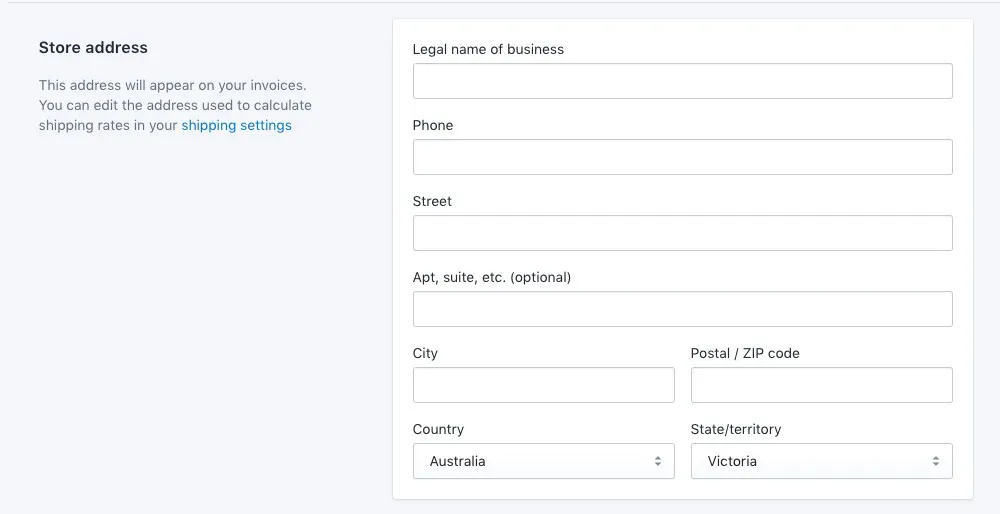
Shopify-1

Store Currency

The store currency must correspond to the Afterpay account region.

To set the store currency:

  1. Go to: Shopify Admin > Settings > General.

  2. Under Standards and formats, the Currency must be United States Dollars (USD).
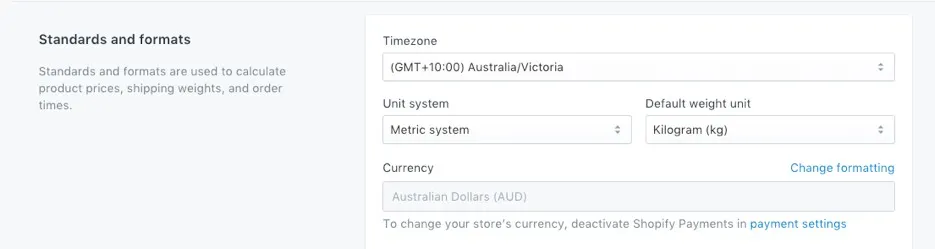
hopify-2.png

Payment Settings

Check if you have Automatically at checkout or Automatically when order is fulfilled enabled.
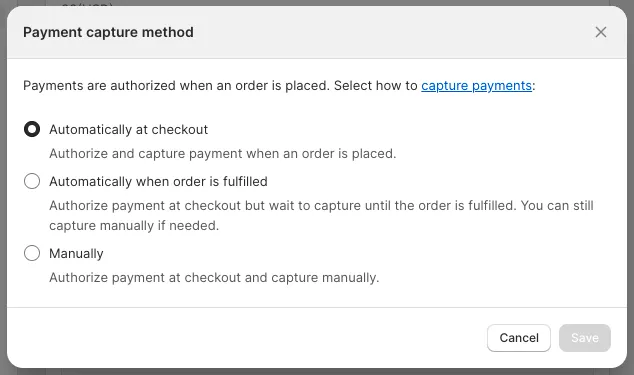
shopify-get-started-1.png

In the Payment Settings, you can also apply manual capture for all payment types. If you have enabled Manually, follow these instructions:

Shopify Manual Capture

Next Steps

Go to the Add Afterpay at Checkout page and add Afterpay to your checkout pages.